
Error Control & Redirect Manager
Manage WordPress-level 401, 403, 404, and 410 handling, Quick Redirect Rules, redirect activity, and advanced Pro routing from one administration workspace. Start with the free core, then add Pro for custom error pages, custom URL destinations, WordPress page responses, advanced URL and path rules, scheduling, reporting, and additional redirect options.
Explore the Plugin Interface
Browse the three main administration areas. Use the arrows or thumbnails to move between screenshots, and click the main image when you want to open the larger preview.
Error & Redirects
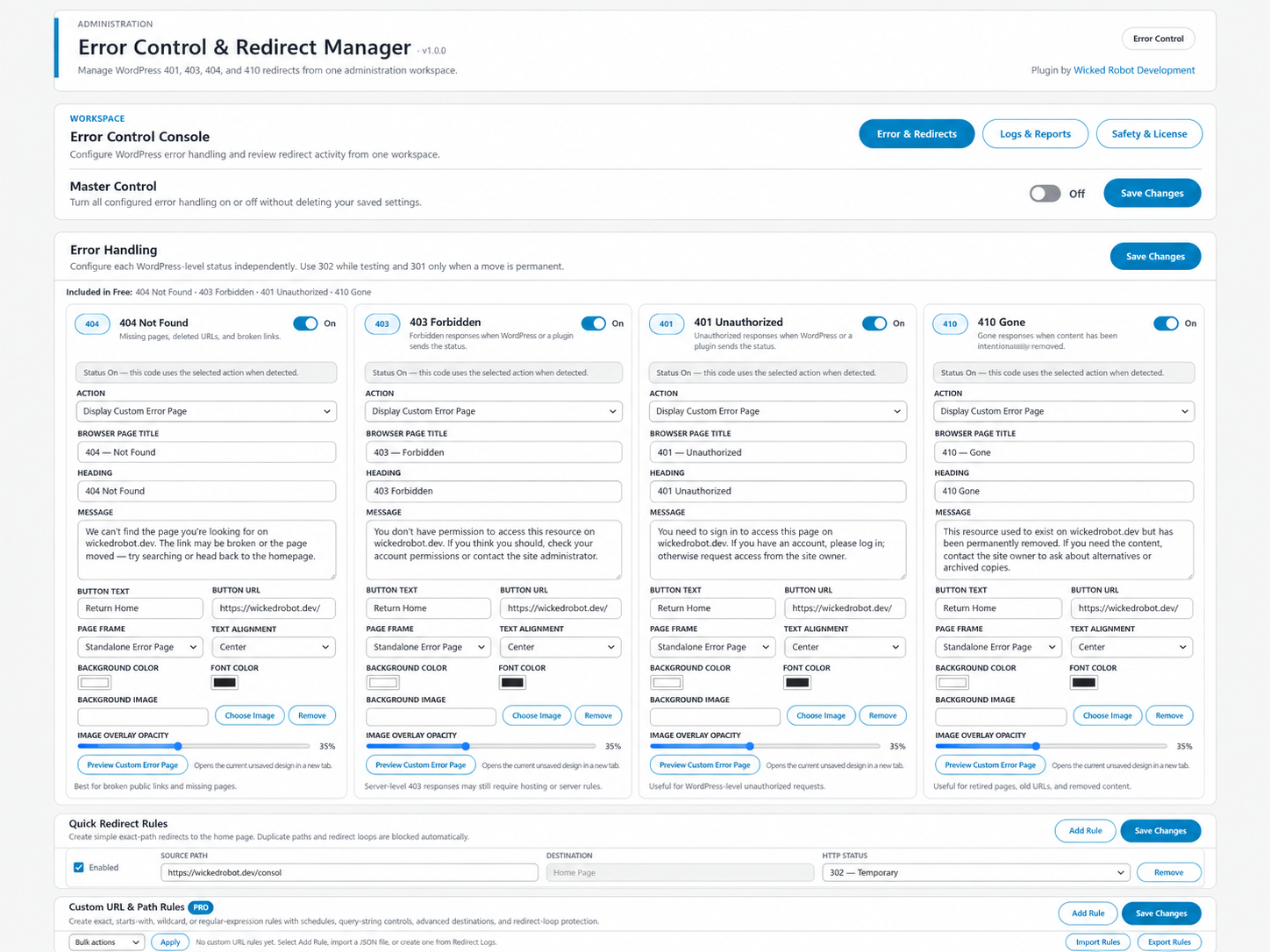
Configure error handling, custom error pages, Quick Redirect Rules, and advanced URL/path rules from one workspace.
Choose Your Plan
The free core is available separately. Every paid plan unlocks the same Pro features; the only difference is the number of licensed websites. Pro licenses are billed yearly. Launch pricing is shown with the regular annual price for reference.
Free Core
WordPress Plugin
- 401, 403, 404 and 410 controls
- 301 and 302 redirects
- Exact-path Quick Redirect Rules to Home Page
- Redirect Logs with hit counts and referrers
- Create Redirect from a log entry
- CSV export, retention and loop protection
Personal
1 Website
Regular $24.99/year
- All Pro features
- 1 Pro site activation
- Custom error-page builder and preview
- Advanced URL and path rules
- Advanced logs, statistics and reports
- Licensed Pro updates and support
Business
5 Websites
Regular $49.99/year
- All Pro features
- 5 Pro site activations
- Custom error-page builder and preview
- Advanced URL and path rules
- Advanced logs, statistics and reports
- Licensed Pro updates and support
Agency
25 Websites
Regular $99.99/year
- All Pro features
- 25 Pro site activations
- Custom error-page builder and preview
- Advanced URL and path rules
- Advanced logs, statistics and reports
- Licensed Pro updates and support
Free & Pro Features
Compare the free core with the advanced features unlocked by Error Control & Redirect Manager Pro.
Supported Error Codes
The free core and Pro support WordPress-level 401, 403, 404, and 410 handling when the request reaches WordPress.
Page Not Found
Control WordPress-level not-found handling for missing pages and resources.
Forbidden
Control supported access-denied responses when WordPress reaches a 403 status.
Unauthorized
Manage supported WordPress-level responses when authentication or authorization is required.
Content Gone
Control supported responses for content that has been intentionally and permanently removed.
Included in Free
Error-Code Redirects
Redirect supported 401, 403, 404, and 410 responses to the Home Page with 301 or 302 status choices.
Quick Redirect Rules
Create exact-path Quick Redirect Rules that route matching paths to the Home Page.
Redirect Logs
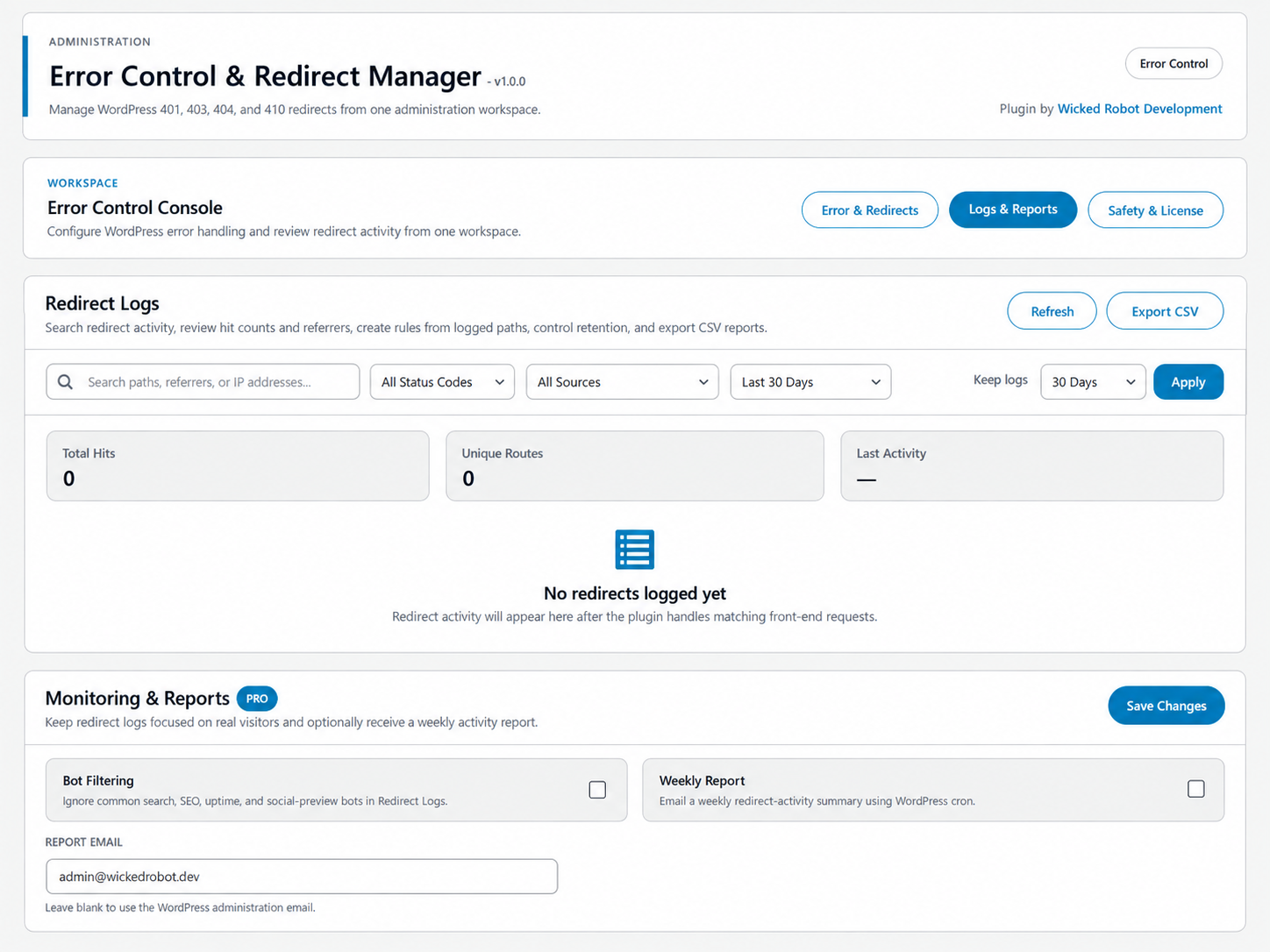
Track source path, destination, HTTP status, hit count, first and last activity, and recent referrer.
Create Redirect from Log
Turn a logged source path into a redirect rule directly from the Redirect Logs screen.
CSV & Retention
Export Redirect Logs to CSV, choose a retention period, search logs, filter by status, or clear stored activity.
Safety Controls
Includes duplicate-rule detection, direct and Quick Rule loop protection, administrator bypass, and front-end GET/HEAD request safety.
Pro Unlocks
Custom Destinations
Send supported error-code redirects to validated custom URLs in addition to the Home Page.
Custom Error Pages
Build branded 401, 403, 404, and 410 pages with content, colors, backgrounds, layout controls, and preview.
WordPress Page Responses
Display an existing published WordPress page at the original URL while preserving the selected error status.
Advanced URL & Path Rules
Create multiple exact, Starts With, Wildcard, and Regular Expression routing rules.
Schedules & Query Controls
Add start/end schedules and choose whether query strings are ignored, matched exactly, or preserved on redirect.
Advanced Reporting
Add bot filtering, advanced Redirect Log statistics, and optional weekly redirect-activity email reports.
Custom Error Pages & Full URL/Path Rules
Every Personal, Business, and Agency license includes the same Pro design and routing tools.
Custom Error-Page Builder
Page Content
Customize browser title, heading, message, button text, and button destination.
Background Styling
Choose background and text colors or select a background image from the WordPress Media Library.
Image Overlay
Adjust background-image overlay opacity for readability.
Theme or Standalone
Use the WordPress theme header/footer or render a focused standalone error page.
Page Alignment
Choose left or centered content alignment for custom error pages.
Preview Custom Error Page
Open the current unsaved custom error-page design in a new tab before saving it.
Custom URL & Path Rules
Multiple Rules
Add multiple independent routing rules and enable or disable them individually.
Four Match Types
Use Exact, Starts With, Wildcard, or Regular Expression matching.
Action-Aware Fields
Only controls relevant to the selected action are displayed while common source and rule controls remain available.
Custom Error Actions
Route matching requests to custom 401, 403, 404, or 410 pages.
Redirect Destinations
Redirect to the Home Page, a custom URL, or an existing published WordPress page.
Bulk Actions
Bulk Enable, Disable, or Delete advanced rules from the rule manager.
JSON Import & Export
Export advanced rules to JSON and import compatible rule data in the browser.
Scheduling
Set optional start and end dates/times for advanced rules.
Query Strings & Loop Safety
Control query-string behavior with duplicate detection plus chained and direct redirect-loop protection.
Redirect Status Codes, Logs & Reporting
Free includes 301 and 302 plus the Redirect Logs foundation. Pro adds 307/308 and advanced reporting tools.
Permanent
Use when the original URL has permanently moved.
Temporary
Use for temporary redirects or while testing.
Temporary — Preserve Method
Temporary redirect that preserves the original request method.
Permanent — Preserve Method
Permanent redirect that preserves the original request method.
Redirect Logs
Search & Status Filters
Search stored redirect activity and filter entries by HTTP status.
Hit Counts & Referrers
Review hit counts, first/last activity, source, destination, status, and recent referrer information.
CSV Export & Retention
Export activity to CSV, set log retention, or clear stored Redirect Logs.
Bot Filtering
Filter common search, SEO, uptime, and social-preview crawlers from reporting views.
Advanced Statistics
View top source, status breakdown, and top referrer statistics.
Weekly Email Reports
Optionally send redirect-activity email reports using WordPress cron.
How It Works
Install the free core first. Add Pro only when you need the advanced feature set.
Choose Free or Pro
Use the free core, or choose Personal, Business, or Agency based on the number of Pro site activations you need.
Install the Free Core
Install and activate Error Control & Redirect Manager through the WordPress Plugins screen.
Install Pro if Purchased
Install Error Control & Redirect Manager Pro alongside the free core.
Activate Your License
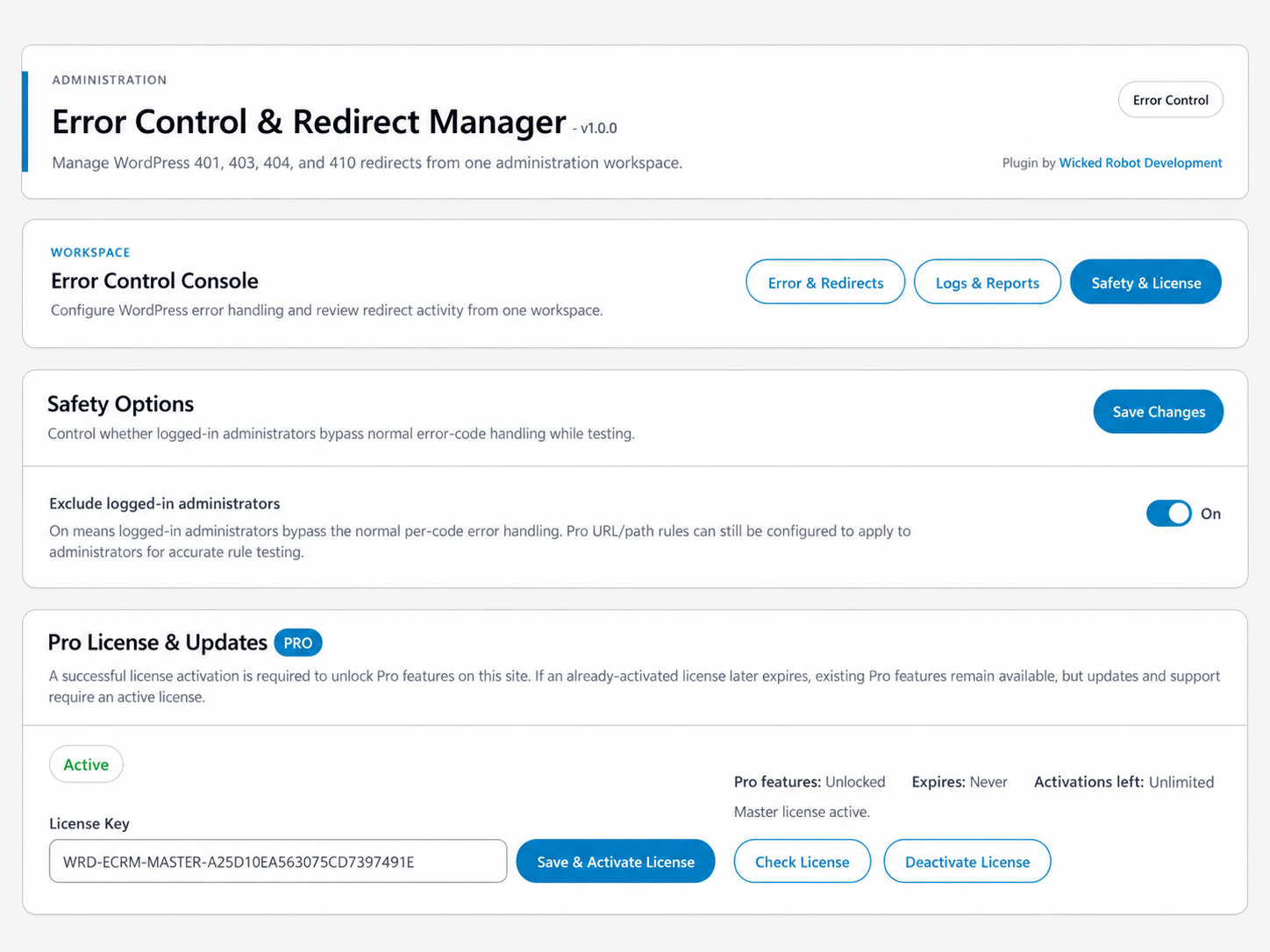
Open Pro License & Updates, enter your license key, and activate it to unlock Pro features on the site.
Product Information
Current first-release information for Error Control & Redirect Manager v1.0.0 and its Pro add-on.
Important Error Handling Note
WordPress-Level Errors
Error Control & Redirect Manager handles supported responses when the request reaches WordPress.
Server-Level Errors
Errors that occur before WordPress loads must be handled by the server, hosting provider, firewall, or CDN.
Start Free or Unlock Pro
Use the free core for essential error handling, Quick Redirect Rules, and Redirect Logs. Add Pro for custom error pages, custom destinations, full URL/path rules, scheduling, advanced reporting, 307/308 redirects, licensed updates, and support.
Compare Free & Pro Plans